Offer import
Paste job posting text or a job-offer URL; HireMate extracts readable text from the page.
 HireMate
Private Apple-platform career cockpit
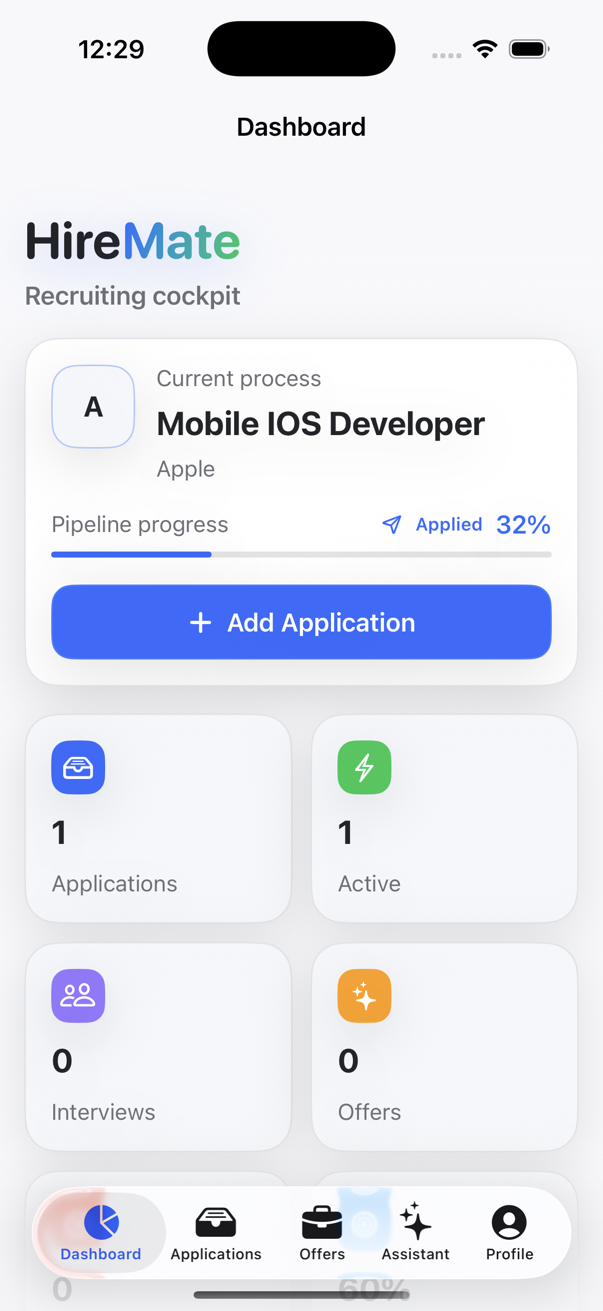
Save job offers, track every application and turn lengthy job descriptions into clear, useful information.
The usual mess
Offer links sit in notes, chats, browser tabs, and inboxes.
Application status gets hard to remember after a few active roles.
Salary ranges, location rules, and contract details disappear inside long postings.
Recruiter contact, follow-up dates, and interview notes need one calm place.
Core workflow
Paste job posting text or a job-offer URL; HireMate extracts readable text from the page.
The app extracts company, position, salary range, contract, remote policy, location, requirements, benefits, and summary.
Paste CV text or import a text-readable PDF; HireMate stores extracted profile fields for matching.
When a profile exists, local AI can estimate match score, interview probability, strengths, missing skills, risks, and a recommendation.
Track saved, applied, recruiter call, technical, final, offer, and rejected stages with dates, recruiter details, reminders, and notes.
Generate interview prep, analyze recruiter messages, and draft follow-ups from saved app data.
Flow
Paste a job offer link or posting text.
Let HireMate extract useful job details with Apple Foundation Models when available.
Save the offer and create an application record.
Track status, reminders, recruiter notes, match score, and interview prep.
Privacy
The app uses SwiftData storage in the app container and Apple's Foundation Models framework for AI work. Importing a job-offer URL makes a network request to that job site. HireMate does not use CloudKit, a custom synchronization backend, advertising, analytics, crash-reporting SDKs, trackers, external AI APIs, in-app purchases, or subscriptions.
FAQ
HireMate is a native iOS, iPadOS, and macOS career assistant for saving job offers, tracking applications, importing CV profile data, and preparing with local AI tools.
You paste offer text or a URL. For URLs, HireMate downloads readable page text, then Apple's Foundation Models framework extracts structured job fields when the local model is available.
The app uses SwiftData with a persistent store in the app's Application Support container. HireMate does not use CloudKit or a custom synchronization backend.
You can delete individual applications, unlinked job offers, and the CV profile in the app. Linked offers are archived instead of deleted. You can remove all local app data by uninstalling the app.
HireMate does not use advertising, analytics, crash-reporting SDKs, trackers, external AI APIs, CloudKit, or a custom synchronization backend. If you import by URL, the job site receives the page request needed to fetch the posting.
No. HireMate currently does not require account registration or login.
Email hiremate.jobtracker@gmail.com with device, OS version, app version, and steps to reproduce the issue.